This article was also published in DZone.
In the [first article]({% post_url 2014-11-06-Microservices-in-Microcontainers-with-Docker %}) I presented a way to create Microcontainers which use volume containers to share runtimes and executables so that the actual application containers can be kept small. The containers are based on BusyBox (progrium/busybox) and necessary libraries are symbolically linked so that the executables work in the very light environment.
In this article I take the concept forward with a Java runtime environment and service registration and discovery using Consul.
The concept is built on Docker’s ability to use multiple volume containers per application container. This allows the container to have a mix of different executables available and provide a specialized, minimal runtime for a specific application like Jetty.
I present an example which runs Consul for service registration and discovery in all containers, a Node.js-based hello world application, a Java-based hello world application on Jetty and cAdvisor for container monitoring. The set-up can be run with Weave based networking with static internal IP addresses or without it.
The concept is built in three parts:
Fileboxes containing the executables and runtime environments. The source code can be found from github at SirIle/fileboxes.
Microboxes setting up the application containers with everything linked into place. The source code can be found from SirIle/microboxes.
Microtestboxes containing the actual applications for the demo and runit configuration extending the microboxes. The source code is available at SirIle/microtestboxes.
This image shows how the application containers are built by extending containers. It also shows which fileboxes are needed for the application containers to work and which ports are exposed.
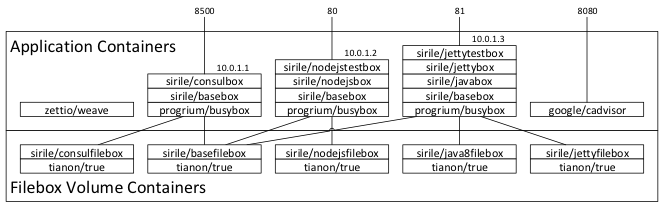
Corresponding docker.io trusted builds have been made so trying out the examples doesn’t require local building. The filebox volume containers need to be created locally.
Fileboxes
Fileboxes are special containers that only define volumes. They are based on
tianon/true image
which only contains an assembler version of true command and causes minimum
overhead (125 bytes) on the file container.
Basefilebox
Basefilebox contains the components that are provided to all containers. For this demo that means Consul for service registration and discovery between containers and runit to allow Consul and the actual application to run at the same time in the container. The buildfile copies the executables from the image to the correct location in the volume.
Consul
As Consul is statically linked it is extremely easy to get it to run. Main idea is to have a Consul agent running in all containers so that service discovery is trivial. As all the containers get an own IP either from the Docker itself or from an external network configuration mechanism like Weave, services can be left running in the default ports and use DNS A-records for service discovery. This simplifies things as there is no need to query for ports or extra information, which could be done using SRV records or a REST-based API.
A shell script is used to start the Consul which checks if an environment variable called DC is defined. If it is, the script waits for the Weave interface to become available before getting the IP of that interface and announcing that with Consul. If it isn’t, the IP of the container is received from the /etc/hosts file.
Runit
Runit is used to control multiple processes running in the microcontainer. It is
used instead of supervisord as it is very small and doesn’t require any extra
libraries to be available. It consists of two commands: runsv and runsvdir.
Dockerfile for the base container
| |
Javafilebox
Oracle JRE 8
The Java runtime is quite large. I looked around for stripped versions, but most either weren’t very compatible or were quite old. In the end I figured that sharing the runtime-executables via a volume container could be a good trade-off between compatibility and size. This way the volume container is built once and then all the containers that need the Java runtime on that host can just include it. Without any extra modifications, the size of the image is 168.5 MB. Building the volume container is extremely quick, but downloading the image will take some time.
Dockerfile for the Java 8 container
| |
Nodejsfilebox
Node executable that was built on the Ubuntu host only requires the libstdc++ library to run. This nodefilebox includes the executable and the library. I thought about including npm as well, but decided against it as the container is meant to be a runtime instead of a development environment. This way the application with all the dependencies can be built on host (or later on a build-container) and the resulting files can just be copied to the application container.
Dockerfile for the Nodejs volume container
| |
Jettyfilebox
This filebox contains the unpacked Jetty 9 distributable. To be usable, the container running this must also use the Javafilebox to provide the JRE.
Dockerfile for the Jettyfilebox
| |
Building the volume containers from the images
The volume containers can be built with the following four commands:
| |
This also downloads the container images to the local registry. The JRE image is rather large, others are small.
Microboxes
These are containers that stack on top of each other to build the runtime environments. They link the executables and libraries that the filebox volume containers provide to the file system. Some of them can be started by themselves instead of extending with applications for development and testing purposes. More information about this can be found from corresponding README.md files in Github.
Basebox
A base Microcontainer built on top of progrium/busybox. Not that useful by itself, but acts as a base for running other applications. Includes symbolic links for Consul and runit executables. It also includes basic configuration for runit, basic consul configuration including DNS server port specification for the normal port 53 so that it can be used as the local DNS server. The container fires up runit which starts the execution of consul and also other runit controlled processes that can be configured under /etc/service.
Everything built on top of Basebox requires basefilebox volume container for the executables.
Dockerfile for Basebox
| |
Consulbox
A Microcontainer running on top of sirile/basebox which offers a consul server and consul UI. It also contains a start script for the Consul server which can adapt to Weave provided networking if the environment variable DC has been set. Otherwise it uses the normal IP of the container.
Dockerfile for Consulbox
| |
Javabox
A Microcontainer for a Java based application. The version of the JRE is decided by the volume container that has the files.
Dockerfile for Javabox
| |
Jettybox
Jettybox build file does nothing at the moment as there is no need to link Jetty
executables to the file system because Jetty can be started directly with a
java -jar command. The container is still created and the actual application
container is built on top of it.
Nodejsbox
A Microcontainer that can be used to run nodejs applications.
Dockerfile for Nodejsbox
| |
Microtestboxes
Jettytestbox
The Jetty example container contains just the example application and configuration plus the runit configuration to start Jetty. The container registers itself to Consul and tells that it provides a jettyhello-service. As the container is based on basebox, it automatically launches the runit defined in that Dockerfile.
Example war-file was downloaded from Apache Tomcat page. It contains a servlet and a jsp that can be used to demonstrate that the Jetty environment is fully functional.
Dockerfile for Jettytestbox
| |
Nodejstestbox
A very simple nodejs and express based hello world application. The container registers itself to Consul and tells that it provides a nodehello-service.
Dockerfile for Nodejstestbox
| |
Running the example application
The github project contains shell scripts which can be used to start the applications. As docker.io trusted builds have been defined, local building is not necessary.
Running with Weave provided networking
This can be started with the startTestboxes.sh script, which does the
following:
| |
Running without Weave
Running the example without Weave networking can be done with the
startTestboxesNoWeave.sh script which does:
| |
Testing the application using a browser
There are several applications available:
- Consul UI can be accessed at port 8500 (for example http://10.10.10.30:8500)
- Nodejs based test application runs at port 80 (http://10.10.10.30)
- Jetty based test application runs at port 81 at context /sample (http://10.10.10.30:81/sample)
- cAdvisor runs in port 8080 (http://10.10.10.30:8080)
Testing Consul based connectivity
Consul provided DNS can be used to connect to for example a back-end database that has registered itself as a service. For now there are three services registered: consul, nodehello and jettyhello. Calling between containers can be demonstrated with:
| |
This shows that the Consul provided DNS resolves the address nodehello.service.consul to the Weave given internal IP address of nodebox container. Using Weave the container could well be running on a separate host, even on another service provider.
Conclusions
This is the list of the container images:
| |
As can be observed, the application containers are very small, around 5 MB. The memory usage varies from about 25MB of the nodejs container to around 100 MB for the untuned Jetty container. Running services as Microservices with the runtime bundled with the service is a feasible thing to do, especially if the runtimes are shared with volume containers which helps to keep the application containers small. This leads to extremely fast build and startup times for the application containers.
Next steps
The goal of this exercise was to prove that stand alone Microservices are doable on Microcontainers with Docker. They are. They can provide a lot of flexibility in creating the runtime distributed environment especially when service registration and discovery is used along with advanced networking so that the services can reside on multiple nodes.
Next step could be to implement a real multi-tiered application on this base instead of just simple example applications. Suggestions are welcome.